🧾 File Naming Rules
Movies & TV Shows
Expand movie and TV show naming rules
Series Recognition Rules
- Include a season and episode marker such as
S02E03in each TV episode filename. - You can also use an episode-only marker such as
EP03. MDC treats it as episode 3 of Season 1. - Chinese markers such as
第2季3集and第3集are also recognized. Keep these characters exactly as shown; English phrases such asseason 2 episode 3and3 episodesare not supported.
Series Naming Examples
text
The.Walking.Dead.S01E01.2010.mp4
The.Vampire.Diaries.S01E13.2010.720p.BluRay.x264.AC3-CMCT.mkv
Crime.Diary.EP01.mp4
Movie Naming Examples

text
Inception.2010.UHD.BluRay.1080p.DTS.HDR.x265-TnP.mkv
Kung.Fu.Hustle.2004.BluRay.1080p.x265.10bit.2Audio.MNHD-FRDS.mkv
The.Martian.2015.mp4
Resident.Evil.2002.1080p.mp4
[The.White.Storm].2013.BluRay.1080p.x264.DTS.2Audios-CMCT.mp4
12.Years.a.Slave.mp4
[example-site]Chernobyl.Diaries.2012.BluRay.mp4
Blue.Beetle.2023.BD.1080P.mkv
Test.Movie.2022.HD.1080P.mkv
Redemption.Day.BD.1080p.mp4
Movie and TV Show Naming Suffixes
TIP
Naming suffixes are only technical markers. The program only adds tags to NFO files and watermarks to cover images based on the file name. It does not inspect file content.
The developer is not responsible for file content and does not represent any specific position.
Expand naming suffix and custom watermark instructions
| Watermark Type | Video File Name |
|---|---|
| 4K | xxxxxx-4k.mp4 |
| 8K | xxxxxx-8k.mp4 |
| Original Disk | xxxxxx.iso |
| Chinese Subtitles | xxxxxx-C.mp4 |
Custom Watermark Image Files
- Use a PNG image sized around
769 x 374or with a similar ratio. It must contain a transparent layer, otherwise loading will fail - Create a
watermarksdirectory under the.mdcdirectory in the current user directory - If the
watermarksdirectory contains files with the names below, they will override the built-in watermark images (case sensitive)
| Watermark Type | Watermark File Name |
|---|---|
| Chinese Subtitles | SUB.png |
| 4K | 4K.png |
| 8K | 8K.png |
| Original Disk | ISO.png |
Other Media
Expand other media naming rules
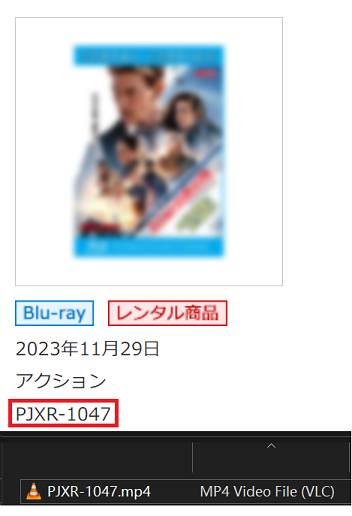
Select Other Media for media identified by a catalog ID, including releases from FANZA/DMM, FC2, and DLsite. Supported filename examples:
Case Insensitive
| Video Type | File Name |
|---|---|
| Regular video | XXX-888.mp4 lorem.11.22.33.mp4 XXXXXX-114514_191.mp4 XXXXX-191981-100.mp4 |
| Multi-part video | XXX-777-CD1.mp4 XXX-777-CD2.mp4 XXX-777-part1.mp4 XXX-777-part2.mp4 (.cdX and .partX formats are also supported, where X is the part number) |
| DMM/FANZA | test00114.mp4 |
| FC2 | FC2-666666.mp4 |
| Fantia | FANTIA-666666.mp4 |
| DLsite | VJ555555.mp4 RJ444444.mp4 |
| Getchu | GETCHU-123456.mp4 item654321.mp4 |
| Gcolle | gcolle-987654.mp4 |
| Anime series and other Japanese file names | [xx字幕组][xxx]xxxxxxx[xxx][x264].mp4 xxxxxxxxx.mp4 |
Other Media Naming Suffixes
TIP
Naming suffixes are only technical markers. The program only adds tags to NFO files and watermarks to cover images based on the file name. It does not inspect file content.
The developer is not responsible for file content and does not represent any specific position.
Expand naming suffix and custom watermark instructions
| Watermark Type | Video File Name |
|---|---|
| Leak | xxx-555-leak.mp4 |
| AI Demosaic | xxx-444-hack.mp4 |
| LTX | xxx-444-LTX.mp4 |
| 4K | xxx-333-4k.mp4 |
| VR | ddd-555-vr.mp4 |
| Original Disk | xxx-xxx.iso |
Custom Watermark Image Files
- Use a PNG image sized around
769 x 374or with a similar ratio. It must contain a transparent layer, otherwise loading will fail - Create a
watermarksdirectory under the.mdcdirectory in the current user directory - If the
watermarksdirectory contains files with the names below, they will override the built-in watermark images (case sensitive)
| Watermark Type | Watermark File Name |
|---|---|
| Subtitles | SUB.png |
| 4K | 4K.png |
| 8K | 8K.png |
| Original Disk | ISO.png |
| Leak | LEAK.png |
| VR | VR.png |
| Uncensored | UNCENSORED.png |
| AI Demosaic | HACK.png |